Connect your harness
If it talks to a model, you can govern it with TapPass. Leave the app exactly as it is and change one thing: where it sends inference. From that moment every prompt, completion, tool call, and file it touches flows through your policy, your audit trail, and your approvals.
No SDK rewrite. No forked client. You redirect a base URL, or add TapPass as a tool server, and the app never knows the difference, except that it is now governed.
Just want the values to paste in? Jump to the three ingredients: your base URL, a TapPass key, and the model IDs.
The two ways TapPass sits in the path
Section titled “The two ways TapPass sits in the path”Most tools connect on one of two planes. Some support both. In each case TapPass is a single front door, so one connection reaches everything behind it.
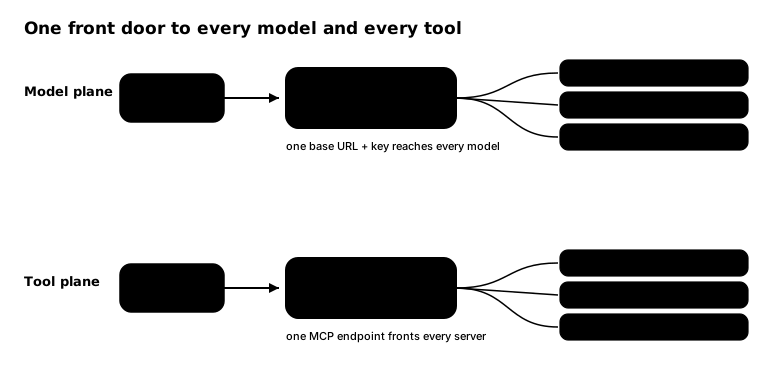
- Model plane: one endpoint, every model. TapPass has a native model router. The tool points at one base URL with one key, and TapPass routes each call to the right provider (OpenAI, Anthropic, Azure, Bedrock, Gemini, or a model you host). You add or switch models in TapPass, not in every app, and every call is governed.
- Tool plane: one endpoint, every MCP. TapPass is a virtual MCP. The agent connects to one TapPass MCP endpoint that fronts all of your MCP servers, so every tool call across every server runs through the same policy and audit trail.
| Plane | What you change in the tool | What TapPass governs | Endpoint |
|---|---|---|---|
| Model plane | the model base URL + API key | the inference (prompts, completions, streaming) | /v1/messages or /v1/chat/completions |
| Tool plane | add TapPass as an MCP server | what the agent does (tools, data, actions) | the TapPass MCP endpoint |
Coverage at a glance
Section titled “Coverage at a glance”Two questions decide coverage for any harness: can TapPass govern the model call, and can it govern the tool calls. Here is where each one stands.
| Harness | Model calls | Tool calls | Notes |
|---|---|---|---|
| Desktop & chat apps | |||
 Claude Desktop | Yes | Yes | Gateway mode governs Chat, Cowork, and Code; MCP tool servers governed |
| OW Open WebUI | Yes | Yes | OpenAI-compatible base URL; tools via MCP |
| Lc LibreChat | Yes | Yes | Custom endpoint; MCP servers governed |
| Coding agents & IDEs | |||
| Claude Code | Yes | Yes | ANTHROPIC_BASE_URL; MCP tools governed |
| Cu Cursor | Yes | Yes | Chat and edit governed; Tab and indexing bypass to Cursor. MCP tools governed |
| Cn Cline | Yes | Yes | Anthropic or OpenAI mode; MCP tools governed |
 GitHub Copilot | Yes | Yes | BYOK endpoint; MCP tools governed |
| Microsoft Copilot | |||
 Microsoft 365 Copilot | No | Yes | Built-in chat model is locked; govern actions via MCP / connectors |
| Copilot Studio | Partial | Yes | Model via Azure AI Foundry BYOM (TapPass-direct is a workaround); tools via MCP / connectors |
| Custom engine agents | Yes | Yes | You own the orchestrator endpoint; MCP tools governed |
| Low-code & workflow | |||
| n8 n8n | Yes | Partial | LLM via base URL (avoid Agent Builder); tool calls governed when routed through TapPass / MCP, native n8n nodes run in n8n |
| Fl Flowise | Yes | Partial | LLM via OpenAI-compatible node; tools via MCP / TapPass tools, native nodes run in Flowise |
| Lf Langflow | Yes | Partial | LLM via model base URL; tools via MCP / TapPass tools, native components run in Langflow |
| Dy Dify | Yes | Partial | LLM via custom model provider; tools via MCP / TapPass tools, native tools run in Dify |
| Mk Make | Yes | n/a | Model call governed via HTTP; Make executes its own modules, so tool execution is out of band |
| Zp Zapier | Yes | n/a | Model call governed via webhook; Zapier executes its own actions, so tool execution is out of band |
Yes supported Partial partial or workaround No not possible n/a the tool runs the action itself
“Govern the tool calls” means TapPass evaluates and can block the tool execution, which happens when the tool call is routed through TapPass’s MCP server. Even where that column is n/a, the model’s request to call a tool is still visible in the governed model response.
What TapPass can and cannot govern
Section titled “What TapPass can and cannot govern”Be clear-eyed about this: governance is intention based. TapPass governs what you connect to it. A tool that never routes through TapPass is not governed by TapPass. For most teams that is exactly the point: you choose the governed path and route everything through it.
When you need to guarantee that the governed path is the only path, for example to stop an agent reaching a model or a supplier you did not approve, add a confinement layer beneath TapPass:
- Client-side enforcement. Lock the tool’s configuration so it can only reach TapPass. The cleanest example is a managed Claude Desktop rolled out through MDM with read-only settings, so a user cannot point it anywhere else.
- Secure sandboxes. Run the agent inside a sandbox that constrains what it can reach at all. TapPass sits on top of such a sandbox and will sync to NVIDIA OpenShell sandboxes (coming soon). The sandbox makes the TapPass request path the only path; TapPass decides whether each permitted action is right, before it runs, and keeps the record.
So the honest answer to “can you govern everything” is: yes for everything you route through TapPass, and for the rest you pair TapPass with confinement so the governed path is the only one. See Sandboxes and enforcement for how this works end to end, including Claude Code and NVIDIA OpenShell.
Before you start: three ingredients
Section titled “Before you start: three ingredients”Every model-plane connection needs the same three values. Get them once, reuse everywhere.
1. Your gateway base URL
Section titled “1. Your gateway base URL”- TapPass Cloud:
https://app.tappass.ai - Self-hosted: your TapPass host (local development:
http://localhost:9620)
| Endpoint | Purpose |
|---|---|
POST /v1/messages |
Anthropic Messages API (streaming + tool use) |
POST /v1/chat/completions |
OpenAI Chat Completions |
GET /v1/models |
Model discovery (your org’s enabled catalog) |
GET /.well-known/jwks.json |
Offline token verification |
Use https://app.tappass.ai for Anthropic-style clients and
https://app.tappass.ai/v1 for OpenAI-style clients.
2. A TapPass credential
Section titled “2. A TapPass credential”The credential you paste in is how TapPass knows which agent is calling and under which org and policy. One credential maps to one agent identity.
In the app:
- Open Agents and create an agent (or open an existing one).
- On its Connect step, copy the base URL and the API key.
Paste that key into your tool and send it as Authorization: Bearer <key> (TapPass
also accepts X-Api-Key). Rolling out to a team? Give each person their own key so
each is a distinct identity, and hand them out automatically through
MDM.
Prefer the terminal? The same from the CLI: tappass auth developer-key create for
an agent key, or tappass auth pat create <name> for a personal access token. See
the CLI reference for the full command surface.
3. The model IDs
Section titled “3. The model IDs”TapPass model IDs are provider-prefixed, for example
anthropic/claude-sonnet-4-5-20250929 or openai/gpt-4o. In the app, open
Models to see the IDs your org has enabled. (CLI: tappass model list. API:
GET /v1/models.)
Everything you can connect
Section titled “Everything you can connect”Pick your tool for its specific steps.
- Desktop & chat apps: Claude Desktop · Open WebUI · LibreChat
- Coding agents & IDEs: Claude Code · Cursor · Cline · GitHub Copilot
- Microsoft Copilot: Microsoft 365 Copilot · Copilot Studio · Custom engine agents
- Low-code & workflow: n8n · Flowise · Langflow · Dify · Make · Zapier
- Rolling out to many machines: Fleet rollout (MDM)
Verify a connection works
Section titled “Verify a connection works”After connecting any tool, send one message through it, then open the TapPass console and confirm a governed event appears for the agent you used. Event shows up: you are on the governed path. Model answers but no event: the tool is still talking to the provider directly, so re-check the base URL and key.